How to Do Programmatic SEO for Squarespace
Learn how to implement programmatic SEO on Squarespace using integrations, custom fields, and automation tools. Discover the platform's limitations and best alternatives for large-scale projects.

SEOBaby

Squarespace can support programmatic SEO through third-party integrations like SEOmatic, which automates large-scale content creation and publishing with zero coding required. However, Squarespace has limitations compared to platforms like Next.js or Shopify for complex, high-volume programmatic projects due to its restricted API access and manual optimization requirements. Best for small to medium-sized businesses targeting 50–500 pages; not ideal for enterprises needing 10,000+ dynamic pages.
- Best for: Service-based businesses, local SEO targeting, e-commerce stores with 100–1,000 products
- Key trade-off: Ease of use vs. scalability and advanced automation
- Integration availability: SEOmatic integration available; limited third-party tool support compared to other platforms
- Time to implement: 2–4 weeks for setup and initial optimization
What Is Programmatic SEO?
Programmatic SEO is the practice of automatically generating pages at scale to capture long-tail search intent. Instead of manually creating 100 pages, you define a template, feed it data (like locations, products, or services), and let the system generate hundreds or thousands of optimized pages. This approach drives consistent organic growth without ongoing manual work.
For example, a local service business can create location-specific pages (e.g., "Plumbing Services in [City]") for every city they serve, each optimized with local keywords, meta tags, and structured data. Programmatic SEO automates this entire process, reducing months of work to days or weeks.

Can Squarespace Handle Programmatic SEO?
Squarespace has significant limitations for programmatic SEO. The platform was designed for manual, UI-based content creation and optimization. It lacks robust APIs for automated page generation at scale, which is the core requirement for true programmatic SEO.
Squarespace's built-in SEO tools focus on foundational optimization: automatic sitemaps, mobile-friendly design, clean URLs, structured data markup, and customizable meta tags. These features are excellent for baseline SEO but don't support automated, data-driven page generation.
However, you can work around these limitations using integrations. Tools like SEOmatic allow you to define templates and import data, then publish to Squarespace without coding. This approach works for small to medium-scale projects (50–500 pages) but becomes inefficient for larger initiatives.
How to Implement Programmatic SEO on Squarespace
Step 1: Use Third-Party Integration Tools
The most practical approach is using SEOmatic's Squarespace integration. This tool lets you:
- Define page templates with placeholders for dynamic content
- Import data from spreadsheets, databases, or APIs
- Automatically populate metadata, headings, and body content
- Publish pages directly to Squarespace with SEO optimization
- Set up recurring updates without manual intervention
SEOmatic handles schema markup, meta tags, internal linking, and keyword optimization automatically.
Step 2: Leverage Squarespace's Custom Fields Feature
Squarespace's built-in features include custom fields available on all plans. You can:
- Create repeating sections that match your page layout
- Set up collection pages with dynamic content blocks
- Use conditional logic to show/hide content based on data
- Optimize each page's metadata individually through the UI
This approach requires more manual setup but works well for smaller datasets (100–300 pages).
Step 3: Optimize for AI Search Engines
Squarespace now includes AI visibility tracking tools that monitor your brand in ChatGPT, Google AI Overviews, and other AI search engines. When implementing programmatic SEO, ensure each generated page:
- Answers a specific user question clearly in the first paragraph
- Includes unique, valuable content (not template filler)
- Has proper heading hierarchy (H1, H2, H3) with keyword variations
- Contains citations and links to authoritative sources
- Includes structured data for your content type (product, service, article, etc.)
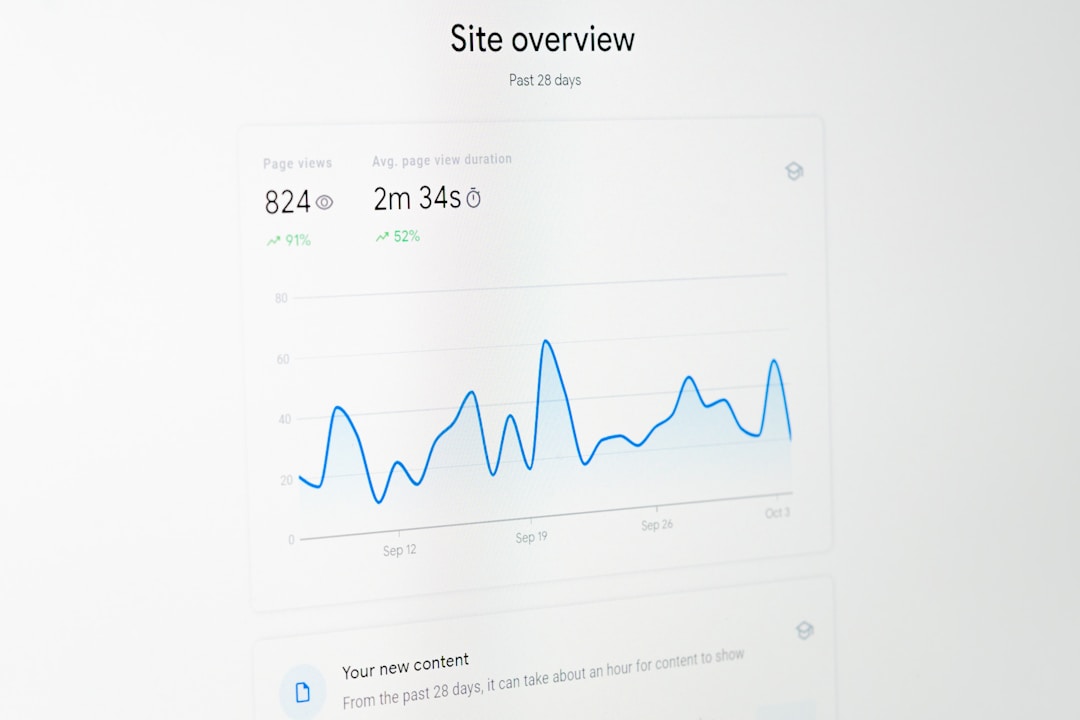
Step 4: Set Up Automated SEO Monitoring
Use Squarespace's integration with Google Search Console to track:
- Which keywords bring the most traffic to generated pages
- Click-through rates and average ranking position
- Crawl errors or indexing issues across your programmatic pages
- User behavior patterns to refine your template strategy
This data helps you iterate quickly and improve performance over time.
Squarespace vs. Other Platforms for Programmatic SEO
| Platform | API Access | Scalability | Ease of Use | Best For |
|---|---|---|---|---|
| Squarespace | Limited (integration-dependent) | Small–Medium (50–500 pages) | Very Easy | Service businesses, local SEO |
| Shopify | Robust GraphQL API | Large (1,000–50,000 pages) | Medium | E-commerce, product-heavy sites |
| Next.js | Full developer control | Enterprise (10,000+ pages) | Hard (requires coding) | Tech startups, SaaS, custom platforms |
| Webflow | Advanced CMS API | Medium–Large (500–5,000 pages) | Medium | Agencies, creative businesses, e-commerce |
WordPress with custom plugin development offers more flexibility than Squarespace but requires technical expertise.
Squarespace Programmatic SEO: Limitations and Workarounds
Limitation 1: No Native API for Page Generation
Squarespace doesn't provide a developer-friendly API for creating pages programmatically. You must rely on third-party integrations like SEOmatic or manually create pages through the UI.
Workaround: Use SEOmatic or similar tools that have built official Squarespace integrations, ensuring your automation is stable and supported.
Limitation 2: Limited Content Scaling
Squarespace is optimized for websites with 100–500 pages. Beyond 1,000 pages, the platform becomes unwieldy, with slower load times and management challenges.
Workaround: Use a hybrid approach – host your programmatic content on a faster, more scalable platform (like Shopify or Next.js) and link to it from your main Squarespace site.
Limitation 3: Template Rigidity
Squarespace's page templates are less customizable than platforms like Webflow. Complex programmatic layouts may require workarounds or creative CSS solutions.
Workaround: Keep your page designs simple, focusing on clear information hierarchy and user experience over visual complexity.
The SEOBaby Solution: Hands-Off Programmatic SEO at Scale
If Squarespace's limitations are holding you back, SEOBaby offers a fully managed programmatic SEO solution that works across multiple platforms – including Squarespace, Shopify, Next.js, Webflow, and Framer.
What SEOBaby does:
- Automated page generation: Creates 60–90 optimized blog posts and landing pages monthly without touching your codebase
- AI search optimization: Content is optimized for ChatGPT, Perplexity, Google AI Overviews, and traditional search engines
- Zero developer time: 5-minute setup; no coding, developer involvement, or ongoing management required
- Technical SEO automation: Automatically generates schema markup, meta tags, internal links, and structured data
- Multi-platform support: Works seamlessly with Squarespace, Shopify, Next.js, Webflow, Framer, and GitHub
- Fraction of agency cost: 80–95% less expensive than traditional SEO agencies ($5,000–50,000/month)
Typical Results: From 0 to 1,000+ organic visits per month in 2–4 months, with consistent growth and zero effort required from your team.
Unlike DIY approaches or freelancers (who ghost you), SEOBaby provides a hands-off, scalable system that grows your organic traffic while you focus on your business.
Key Takeaways
- Squarespace can support small-scale programmatic SEO through integrations like SEOmatic, but it's not designed for large-scale automation
- Use custom fields and collections to create data-driven pages without third-party tools
- Leverage Squarespace's built-in SEO tools – automatic sitemaps, mobile optimization, structured data, and Google Search Console integration
- Monitor AI search visibility with Squarespace's new AI tracking features to stay visible in ChatGPT and other AI engines
- Scale beyond Squarespace's limits by migrating to Shopify, Next.js, or Webflow for enterprise-level programmatic SEO
- For hands-off growth, use SEOBaby to automate programmatic SEO across any platform and scale from zero to 1,000+ monthly organic visits