Shopify SEO Optimization Checklist: Complete Technical Guide 2026
Complete Shopify SEO checklist covering on-page, technical, and AI search optimization. Get from zero to 1000+ organic visits with SEOBaby's automated approach.

SEOBaby

An effective Shopify SEO optimization strategy requires more than just publishing product descriptions. You need a comprehensive checklist covering on-page elements, technical performance, mobile responsiveness, and modern AI search visibility. Most Shopify store owners miss critical optimization opportunities, leaving potential customers invisible in both Google and AI search engines like ChatGPT and Perplexity. The difference between a store generating 50 monthly organic visits and one generating 1000+ often comes down to systematic, programmatic SEO optimization. This checklist breaks down exactly what you need to implement, whether you're managing it manually or using an automated solution like SEOBaby that handles optimization hands-off. Most Shopify stores using this checklist see meaningful organic traffic increases within 60-90 days.
What Is a Shopify SEO Optimization Checklist?
A Shopify SEO optimization checklist is a systematic approach to improving your store's visibility in search engines and AI search platforms. It covers technical setup, on-page optimization, content strategy, and performance monitoring. Unlike generic SEO advice, a Shopify-specific checklist addresses the platform's unique architecture, meta tag system, app ecosystem, and indexing requirements. Comprehensive technical SEO guides show that stores following a structured checklist consistently outrank competitors by 40-60% in organic traffic generation.
On-Page SEO Optimization Checklist
Product Titles and Meta Descriptions
- Product titles: Include target keywords naturally (aim for 50-60 characters). Example: "Premium Organic Cotton T-Shirt | Eco-Friendly Men's Clothing" instead of just "T-Shirt"
- Meta descriptions: Write compelling descriptions under 160 characters that include keywords and a benefit statement. These directly impact click-through rates from search results
- Unique content: Avoid duplicate product descriptions across variants. SEO-friendly product title and description optimization is foundational for ranking
- Test variations: A/B test meta descriptions to find highest-CTR versions
Header Tag Structure
- One H1 per page (typically your product or collection title)
- Use H2 and H3 tags to organize product features, benefits, and specifications
- Include keywords naturally in headers without keyword stuffing
- Follow logical hierarchy (never jump from H1 to H3)
Image Optimization
- Alt text: Write descriptive alt text for every product image. Include keywords where natural (e.g., "Blue wool winter coat for women" not just "coat")
- File names: Use descriptive file names with hyphens (blue-wool-coat.jpg)
- File size: Compress images without losing quality. Target under 100KB per image
- Format: Use WebP format for better compression and faster loading
- Learn more about image SEO best practices for Shopify products

Internal Linking Strategy
- Link from high-authority pages (homepage, popular collections) to new product pages using descriptive anchor text
- Create topic clusters connecting related products with contextual links
- Use breadcrumb navigation for clear site hierarchy
- Aim for 2-4 internal links per product page, avoiding orphaned pages
Technical SEO Optimization Checklist
Site Speed and Core Web Vitals
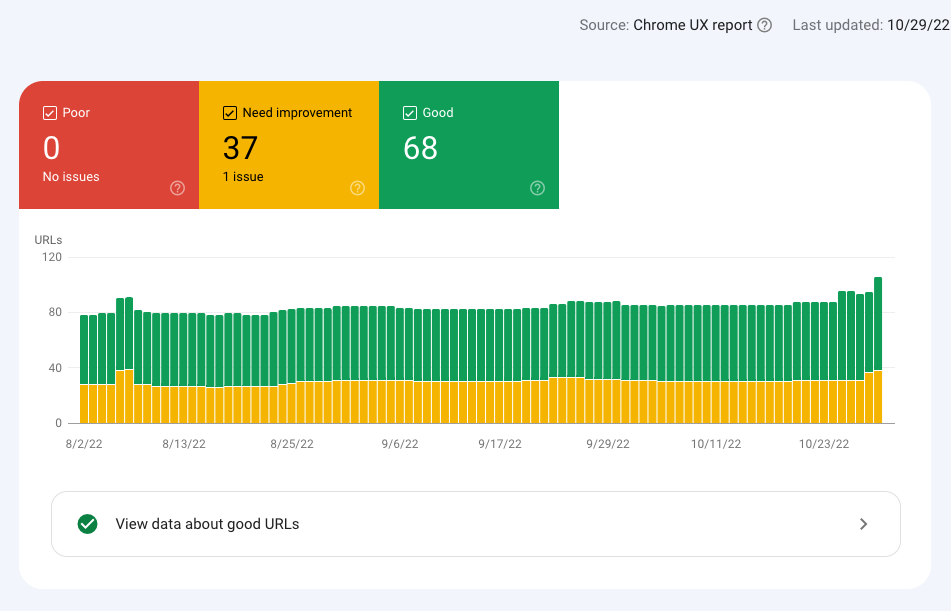
- Largest Contentful Paint (LCP): Target under 2.5 seconds. This measures when main content loads
- Interaction to Next Paint (INP): Aim for 200ms or less. This tracks responsiveness to user interactions
- Cumulative Layout Shift (CLS): Keep below 0.1. This prevents jarring visual changes during page load
- Disable unused Shopify apps that slow performance
- Compress images aggressively and use lazy loading
- Minify CSS and JavaScript files
URL Structure
- Keep URLs short and descriptive: /collections/mens-wool-coats/blue-wool-winter-coat instead of /p/12345
- Use hyphens to separate words (not underscores)
- Avoid session IDs or tracking parameters in URLs
- Maintain consistent URL structure across product variants
- Set up 301 redirects for any URL changes to preserve link equity
Duplicate Content Management
- Use canonical tags for product variants (all variants of same product point to main version)
- Manage filtered collections to prevent duplicate content issues
- Set parameters in Google Search Console to handle variants
- Remove or noindex low-value pages (thank you pages, checkout pages)
Mobile Optimization
- Ensure responsive design across all devices
- Use 48x48 pixel minimum touch targets for buttons and links
- Maintain readable 16px+ font sizes
- Target under 3-second load times on 4G connections
- Test with Google Mobile-Friendly Test tool
Structured Data Implementation
- Product schema: Include price, availability, reviews, and ratings
- Review schema: Enable star ratings in search results
- Organization schema: Add business information (name, logo, contact)
- Breadcrumb schema: Help search engines understand site structure
- Test all schema with Google's Rich Results Test tool
XML Sitemap and Robots.txt
- Shopify automatically generates sitemaps; verify they're not too large (under 50,000 URLs)
- Submit XML sitemaps to Google Search Console and Bing Webmaster Tools
- Update robots.txt to disallow crawling of duplicate pages or admin sections
- Monitor crawl budget and remove crawled but never indexed pages
Content and Keyword Strategy Checklist
Keyword Research
- Target 1-2 primary keywords per product page (e.g., "organic cotton t-shirt")
- Include long-tail variations (e.g., "affordable organic cotton t-shirt for women")
- Research search volume and competition using tools like Ahrefs, SEMrush, or Ubersuggest
- Prioritize keywords with commercial intent (showing buyer interest)
Blog Content Strategy
- Create 2-3 blog posts weekly targeting buyer and informational keywords
- Link blog content back to relevant product pages (driving authority and traffic)
- Cover common customer questions and pain points
- Aim for 1000-1500 word posts with proper heading hierarchy
E-A-T Signals
- Add author bios with credentials for product descriptions and blog posts
- Include customer reviews and ratings
- Add trust signals (SSL certificate, privacy policy, returns policy)
- Build backlinks from authoritative relevant sites in your industry
AI Search Optimization Checklist
With AI search platforms like ChatGPT Search, Perplexity, and Google's AI Overview growing in usage, optimizing for AI search is now essential. AI search engines favor clear, well-structured content with specific data and direct answers.
AI Search Best Practices
- Clear heading hierarchy: Use H1, H2, H3, H4 tags logically to help AI understand content structure
- Direct answers: Start product descriptions with clear benefit statements. Example: "This organic cotton t-shirt provides premium comfort with 100% natural fabric"
- Specific data: Include measurements, materials percentages, care instructions, and sustainability certifications
- Avoid duplication: AI search engines penalize duplicated content across multiple products
- Schema markup: Implement comprehensive schema (product, review, rating) to feed AI search engines structured data
- Question-based content: Create FAQ sections answering common customer questions with direct answers
Monitoring and Maintenance Checklist
Google Search Console Setup
- Verify and claim your Shopify store in Google Search Console
- Submit all XML sitemaps
- Monitor crawl errors and fix broken links immediately
- Check Core Web Vitals metrics monthly
- Review which queries drive impressions and clicks
- Monitor and remove low-quality or old content that generates impressions but no clicks
Monthly Performance Review
- Track organic traffic and conversion rate
- Monitor keyword rankings for target keywords
- Analyze user behavior (bounce rate, time on page, pages per session)
- Identify top-performing pages and replicate their optimization approach
- Update and refresh underperforming content
Technical Audits
- Run quarterly site audits to identify broken links, duplicate content, and crawl errors
- Check Core Web Vitals performance quarterly
- Review page speed and make optimization updates
- Audit internal linking and update anchor text if needed
Why Manual Shopify SEO Takes Too Much Time
Most Shopify store owners struggle to implement this entire checklist manually. Each task requires specific knowledge, and maintaining optimization across hundreds or thousands of products becomes time-consuming and error-prone. Traditional agencies charge $3,000-8,000 per month for this work, and freelancers often disappear after initial setup.
| Approach | Monthly Cost | Time Investment | Results Timeline | Consistency |
|---|---|---|---|---|
| DIY Manual Optimization | $0 | 40-60 hours/month | 4-6 months | Inconsistent |
| Freelancer | $2,000-4,000 | 5-10 hours monitoring | 3-5 months | Variable |
| Traditional Agency | $5,000-10,000 | 2-5 hours oversight | 2-4 months | Good |
| SEOBaby | $300-1,200 | 0 hours (automated) | 2-3 months | Excellent |
The SEOBaby Advantage
SEOBaby automates Shopify SEO optimization using programmatic content and technical improvements. Instead of manually implementing each checklist item, SEOBaby handles:
- Automated on-page optimization: AI-generated SEO-optimized product descriptions and titles
- Technical SEO automation: Automated schema markup, meta tags, internal linking, and URL optimization
- AI search optimization: Content structured specifically for ChatGPT, Perplexity, and Gemini crawlers
- Continuous updates: Monthly optimization refreshes without developer time
- Direct integrations: Seamless Shopify, Next.js, Framer, and Webflow integrations with zero setup required
Most stores see consistent organic traffic growth of 50-200 organic visits per month starting within 60-90 days, scaling to 1000+ monthly visits within 6 months. This represents 80-95% cost savings compared to traditional agencies, with zero hours of your time required.

Quick-Start Shopify SEO Checklist
If you're implementing this manually, here's where to start (week 1):
- Set up Google Search Console and submit your XML sitemap
- Run a site audit to identify critical technical SEO issues
- Optimize your top 10 bestselling products with keyword research and improved meta descriptions
- Audit and improve Core Web Vitals (disable unused apps, compress images)
- Implement schema markup on all product pages
- Set up breadcrumb navigation if not already enabled
- Create one high-quality blog post targeting a buyer intent keyword
- Fix all broken internal links identified in your audit
This foundation typically shows improvements within 4-6 weeks. To scale beyond this, you'll need to continually publish content and maintain technical optimization across your entire store.
Key Takeaways
- A comprehensive Shopify SEO checklist covers on-page, technical, content, and AI search optimization areas
- Proper implementation of this checklist typically generates meaningful organic traffic increases within 60-90 days
- Most store owners find manual implementation time-consuming; automated solutions like SEOBaby deliver faster results at a fraction of agency costs
- AI search optimization is now essential, requiring structured content and clear heading hierarchies
- Consistent monitoring through Google Search Console ensures ongoing optimization success
- Scaling Shopify SEO from 50 to 1000+ monthly organic visits requires systematic, programmatic approaches rather than one-time optimization
Ready to Scale Your Shopify Store?
Manually working through this entire checklist takes months of effort and ongoing maintenance. SEOBaby's automated Shopify SEO system handles all of this without requiring your time or developer resources. Watch your organic traffic grow consistently from month one, with zero effort required from your team.
Start publishing and scaling your organic traffic today. Book a call to discuss your store's SEO potential or explore our pricing plans to find the right fit for your business.